Room(SQLite) and Kotlin

The Room persistence library provides an abstraction layer over SQLite. To use Room in your app, add the following dependencies to your app’s build.gradle file:
dependencies {
    ....
    kapt "org.xerial:sqlite-jdbc:3.34.0"

    // Room
    def room_version = "2.3.0"
    implementation "androidx.room:room-runtime:$room_version"
    annotationProcessor "androidx.room:room-compiler:$room_version"
    kapt "androidx.room:room-compiler:$room_version"
    implementation "androidx.room:room-ktx:$room_version"
}
Note: the “sqlite-jdbc” needed at the time of this blog if you’re running an arm processor as you’ll get this without it: “No native library is found for os.name=Mac and os.arch=aarch64”
After adding those dependencies, let’s once again continue with a clean architectured project by creating the following structure. We’ll only cover the files on display
├─Core
├─Presentation
├─Domain
│ ├─Model
│ │ └─ Todo.kt
│ └─Repository
│   └─ TodoRepository.kt
└─Data
  ├─DataSource
  │ ├─ TodoDataSource.kt
  │ └─Room
  │   ├─ TodoDao.kt
  │   ├─ TodoDatabase.kt
  │   ├─ TodoRoomDataSourceImpl.kt
  │   └─Entity
  │     └─TodoRoomEntity.kt
  └─Repository
    └─TodoRepositoryImpl.kt
data class Todo(
    val id: Int?,
    val title: String,
    val isComplete: Boolean,
)
interface TodoRepository {
    suspend fun getTodos(): Result<List<Todo>>
    suspend fun getTodo(id: Int): Result<Todo>
    suspend fun deleteTodo(id: Int): Result<Boolean>
    suspend fun createTodo(todo: Todo): Result<Boolean>
    suspend fun updateTodo(todo: Todo): Result<Boolean>
}
Next, we’ll specify what our Datasource must do by creating the TodoDataSource interface
interface TodoDataSource {
    suspend fun getAll(): List<Todo>
    suspend fun getById(id: Int)
    suspend fun delete(id: Int)
    suspend fun create(todo: Todo)
    suspend fun update(id: Int, todo: Todo)
}
Ok now let’s implement these project details:
We need three things to allow our Kotlin code to talk to our SQLite DB:
- Data entities: data classes that represent database tables
- Data access objects (DAO): container of methods that map to SQL queries
- Database class: the main access point for persisting data
Let’s start with our data entity. We’ll name this TodoRoomEntity as this represents a room-specific entity. Note how the extra mapping code from TodoRoomEntity to Todo data class in the Domain layer.
@Entity(tableName = "tb_todo")
data class TodoRoomEntity(
    @PrimaryKey(autoGenerate = true)
    @ColumnInfo(name = "id")
    val id: Int?,
    val title: String,
    val is_complete: Boolean
)

fun TodoRoomEntity.toTodo(): Todo {
    return Todo(
        id = id,
        isComplete = is_complete,
        title = title
    )
}
Now let’s create the DAO and the database
@Dao
interface TodoDao {
    @Query("SELECT * FROM tb_todo")
    suspend fun getAll(): List<TodoRoomEntity>

    @Insert(onConflict = OnConflictStrategy.REPLACE)
    suspend fun insert(todo: TodoRoomEntity)

    @Update
    suspend fun update(vararg todos: TodoRoomEntity)

    @Query("SELECT * FROM tb_todo WHERE id = :id")
    suspend fun getById(id: Int): TodoRoomEntity?

    @Query("DELETE FROM tb_todo WHERE id = :id")
    suspend fun deleteById(id: Int)

}
@Database(entities = [TodoRoomEntity::class], version = 1)
abstract class TodoDatabase : RoomDatabase() {
    abstract val todoDao: TodoDao

    companion object {
        const val DATABASE_NAME = "todo_db"
    }
}
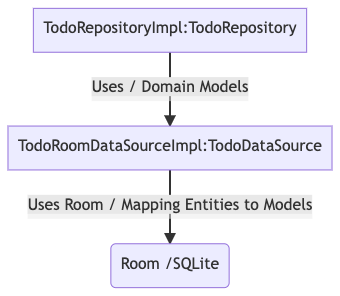
To use the Dao we can create a data source that conforms to the TodoDataSource. We inject the DAO as a dependency.
class TodoRoomDataSourceImpl(private val dao: TodoDao) : TodoDataSource {

    override suspend fun getAll(): List<Todo> {
        return dao.getAll().map { it.toTodo() }
    }

    override suspend fun getById(id: Int): Todo? {
        val todoRoomEntity = dao.getById(id)
        if (todoRoomEntity != null) {
            return todoRoomEntity.toTodo()
        }
        return null
    }

    override suspend fun delete(id: Int) {
        dao.deleteById(id)
    }

    override suspend fun create(todo: Todo) {
        dao.insert(
            TodoRoomEntity(
                id = null,
                title = todo.title,
                is_complete = todo.isComplete
            )
        )
    }

    override suspend fun update(id: Int, todo: Todo) {
        dao.update(
            TodoRoomEntity(
                id = id,
                title = todo.title,
                is_complete = todo.isComplete
            )
        )
    }
}
and then lastly, our TodoRepositoryImpl would implement our TodoRepository:
class TodoRepositoryImpl(private val datasource: TodoDataSource) : TodoRepository {
    override suspend fun getTodos(): Result<List<Todo>> {
        return try {
            Result.success(datasource.getAll())
        } catch (e: Exception) {
            Result.failure(Exception("Error Getting Data"))
        }
    }

    override suspend fun getTodo(id: Int): Result<Todo?> {
        return try {
            val todo = datasource.getById(id)
            Result.success(todo)
        } catch (e: Exception) {
            Result.failure(Exception("Error Getting Todo"))
        }
    }

    override suspend fun deleteTodo(id: Int): Result<Boolean> {
        return try {
            Result.success(true)
        } catch (e: Exception) {
            Result.failure(Exception("Error Deleting Data"))
        }
    }

    override suspend fun createTodo(todo: Todo): Result<Boolean> {
        return try {
            Result.success(true)
        } catch (e: Exception) {
            Result.failure(Exception("Error Creating Todo"))
        }
    }

    override suspend fun updateTodo(todo: Todo): Result<Boolean> {
        return try {
            datasource.update(todo.id!!, todo)
            Result.success(true)
        } catch (e: Exception) {
            Result.failure(Exception("Error Updating Todo"))
        }
    }
}


