# Getting Started with TDD: Kotlin and Jetpack Compose


The [TDD (Test Driven Development)](https://en.wikipedia.org/wiki/Test-driven_development) approach is important when it comes to testing small portions of business logic code in isolation.

In this blog, I'll cover how I would use TDD to build a [clean architecture](https://blog.cleancoder.com/uncle-bob/2012/08/13/the-clean-architecture.html) To-do Jetpack Compose Android application

I'll cover implementing the "Get To-dos" use case.

[![](https://mermaid.ink/img/eyJjb2RlIjoiZ3JhcGggVERcbiAgICAxW1RvZG9MaXN0Vmlld10gLS0-fE9ic2VydmVzIC8gVXNlc3wgMltUb2RvTGlzdFZpZXdNb2RlbF1cbiAgICAyIC0tPiB8SW52b2tlc3wgM1tHZXRUb2Rvc1VzZUNhc2U6IEdldFRvZG9zXVxuICAgIDMgLS0-IHxVc2VzfCA2W1RvZG9SZXBvc2l0b3J5SW1wbDogVG9kb1JlcG9zaXRvcnldXG4gICAgNiAtLT4gfFVzZXN8IDdbVG9kb0RhdGFTb3VyY2VJbXBsOiBUb2RvRGF0YVNvdXJjZV1cbiAgIFxuICAgICIsIm1lcm1haWQiOnsidGhlbWUiOiJkZWZhdWx0In0sInVwZGF0ZUVkaXRvciI6ZmFsc2UsImF1dG9TeW5jIjp0cnVlLCJ1cGRhdGVEaWFncmFtIjpmYWxzZX0)](https://mermaid.live/edit/#eyJjb2RlIjoiZ3JhcGggVERcbiAgICAxW1RvZG9MaXN0Vmlld10gLS0-fE9ic2VydmVzIC8gVXNlc3wgMltUb2RvTGlzdFZpZXdNb2RlbF1cbiAgICAyIC0tPiB8SW52b2tlc3wgM1tHZXRUb2Rvc1VzZUNhc2U6IEdldFRvZG9zXVxuICAgIDMgLS0-IHxVc2VzfCA2W1RvZG9SZXBvc2l0b3J5SW1wbDogVG9kb1JlcG9zaXRvcnldXG4gICAgNiAtLT4gfFVzZXN8IDdbVG9kb0RhdGFTb3VyY2VJbXBsOiBUb2RvRGF0YVNvdXJjZV1cbiAgIFxuICAgICIsIm1lcm1haWQiOiJ7XG4gIFwidGhlbWVcIjogXCJkZWZhdWx0XCJcbn0iLCJ1cGRhdGVFZGl0b3IiOmZhbHNlLCJhdXRvU3luYyI6dHJ1ZSwidXBkYXRlRGlhZ3JhbSI6ZmFsc2V9)


For this type of application, we need 2 types for application testing; UI Testing and **Unit Testing**. We'll be concentrating on the business logic, so we'll only be covering TDD **unit testing**. Before we write any production code, we'll write the test first. 


The application will be structured in the following file and folder structure:

```
.
.
├── src
    ├── Data
    │   ├── DataSource
    │   │   ├── TodoDataSource.kt
    │   │   └── DB
    │   │       ├── Entity
    │   │       │    └── TodoDBEntity.kt
    │   │       └── TodoDBDataSourceImpl.kt
    │   └── Repository
    │       └── TodoRepositoryImpl.kt
    ├── Domain
    │    ├── Model
    │    │   └── Todo.kt
    │    ├── Repository
    │    │   └── TodoRepository.kt
    │    └── UseCase
    │        └── GetTodos.kt
    └── Presentation
        ├── TodoViewModel.kt
        └── TodoListView.kt
└── test
    ├── Data
    │   ├── DataSource
    │   │   └── DB
    │   │       └── TodoDBDataSourceImplTest.kt
    │   └── Repository
    │       └── TodoRepositoryImplTest.kt
    ├── Domain
    │    └── UseCase
    │        └── GetTodosTest.kt
    └── Presentation
        └── TodoViewModelTest.kt
        
```


We'd like to put the "TodoViewModel" under test.

### A note on TDD

**TDD (Test Driven Development)** is a software development process in which the unit test will be written first and after that the original code. In TDD, the design and development of the code are through unit tests.

In the traditional unit tests, the unit test is written after the original code is written. This is only for long-term maintainability. But in TDD the unit test is written first and code evolved through it.

**Red Green Refactor**

Red Green Refactor is an interesting concept in TDD. The stages are given below:

Red - First a failing unit test is created, and it results in red status

Green - We will modify the associated code to just make the unit test pass - resulting in green status

Refactor - Once the test is passing we can refactor the code so that the original implementation is done.


When you create an android project, Android Studio automatically creates a UI Test (androidTest) Package and Unit Test (test) Package. 

Let's start by writing a test for our View Model.

---

#### test_TodoListViewModel_Should_Exist

![Screenshot 2021-10-27 at 11.09.59.png](https://cdn.hashnode.com/res/hashnode/image/upload/v1635325832598/eMNDfDkEu.png)

Obviously the test doesn't build and therefore fails because these file don't exist. We're in <span style="color:red">Red Stage</span>. 

Let's write the minimum code to make the test pass. We need a view model and its mock dependency. 

```kt
class TodoViewModel constructor(private val GetTodos: GetTodos) : ViewModel() {

}
```

```kt
interface GetTodos {
    suspend operator fun invoke(): List<Todo>
}
```

```kt
class MockGetTodosUseCase : GetTodos {

    override suspend operator fun invoke(): List<Todo> {
        var list = listOf(
            Todo(id = 1, title = "One", isComplete = true),
            Todo(id = 2, title = "Two", isComplete = false),
            Todo(id = 3, title = "Three", isComplete = true),
            Todo(id = 4, title = "Four", isComplete = false),
        )

        return list
    }
}
```

The test will now pass - <span style="color:green">Green Stage</span>


![Screenshot 2021-10-27 at 11.11.40.png](https://cdn.hashnode.com/res/hashnode/image/upload/v1635325925322/PStvS1Qgr.png)

Let's add a few more tests to drive the development of the view model

---

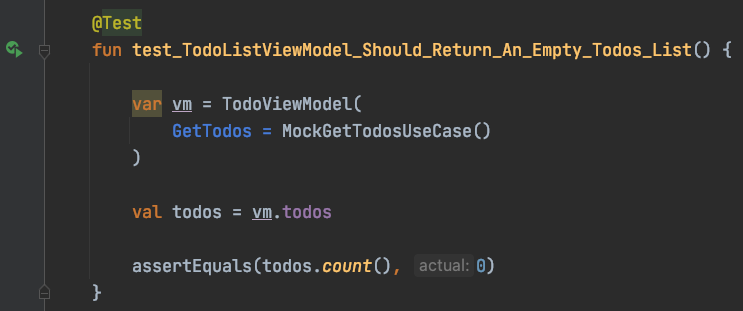
#### test_TodoListViewModel_Should_Return_An_Empty_Todos_List

<div style="border: 2px solid red; text-align: center; margin-bottom:10px">


![Screenshot 2021-10-27 at 11.13.26.png](https://cdn.hashnode.com/res/hashnode/image/upload/v1635326042657/VoQ7YBQ3W.png)

</div>


```kt
class TodoViewModel constructor(private val GetTodos: GetTodos) : ViewModel() {
    private val _todos = mutableStateListOf<Todo>()
    val todos: List<Todo>
        get() = _todos
}
```
<div style="border: 2px solid green; text-align: center; margin-bottom:10px">


![Screenshot 2021-10-27 at 11.15.17.png](https://cdn.hashnode.com/res/hashnode/image/upload/v1635326147481/dA192X59X.png)
</div>

---

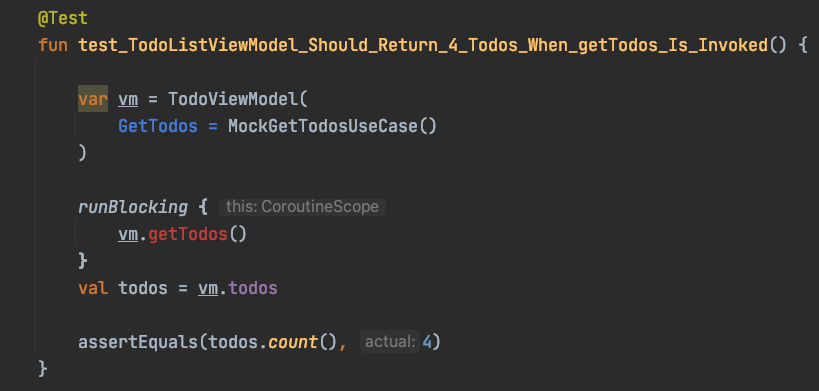
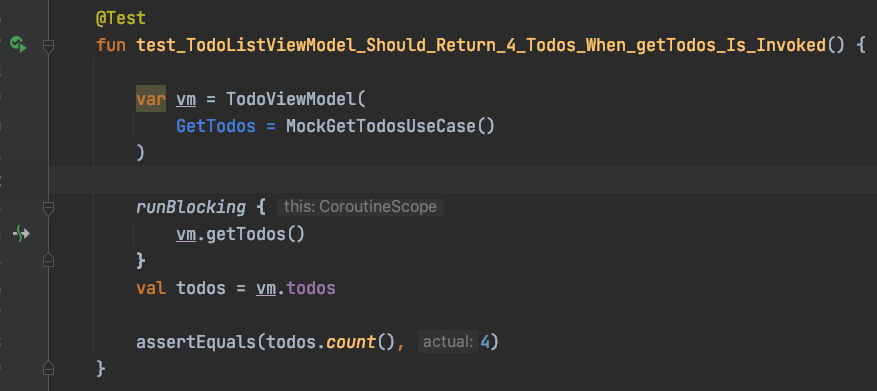
#### test_TodoListViewModel_Should_Return_4_Todos_When_getTodos_Is_Invoked
<div style="border: 2px solid red; text-align: center; margin-bottom:10px">


![Screenshot 2021-10-27 at 11.18.46.png](https://cdn.hashnode.com/res/hashnode/image/upload/v1635326426819/Tmgg_yhhl.png)
</div>


```kt
class TodoViewModel constructor(private val GetTodos: GetTodos) : ViewModel() {
    private val _todos = mutableStateListOf<Todo>()
    val todos: List<Todo>
        get() = _todos

    suspend fun getTodos() {
        _todos.clear()
        val result = GetTodos()
        _todos.addAll(result)
    }

}
```
<div style="border: 2px solid green; text-align: center; margin-bottom:10px">


![Screenshot 2021-10-27 at 11.20.08.png](https://cdn.hashnode.com/res/hashnode/image/upload/v1635326440837/o3Fuu_kaF.png)

</div>

---

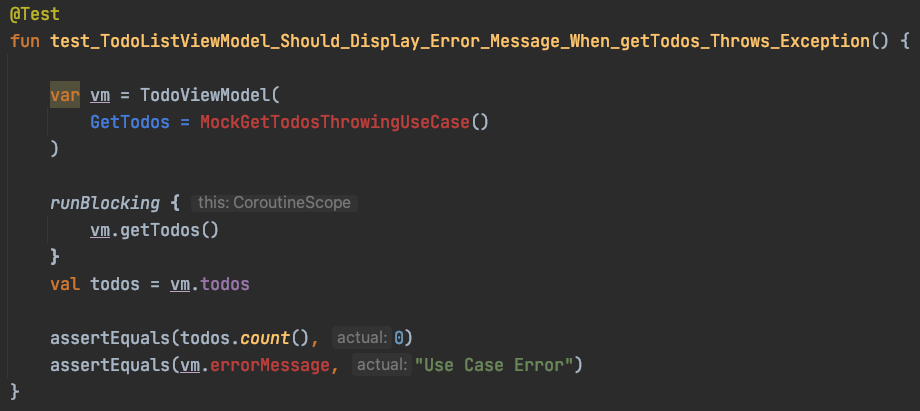
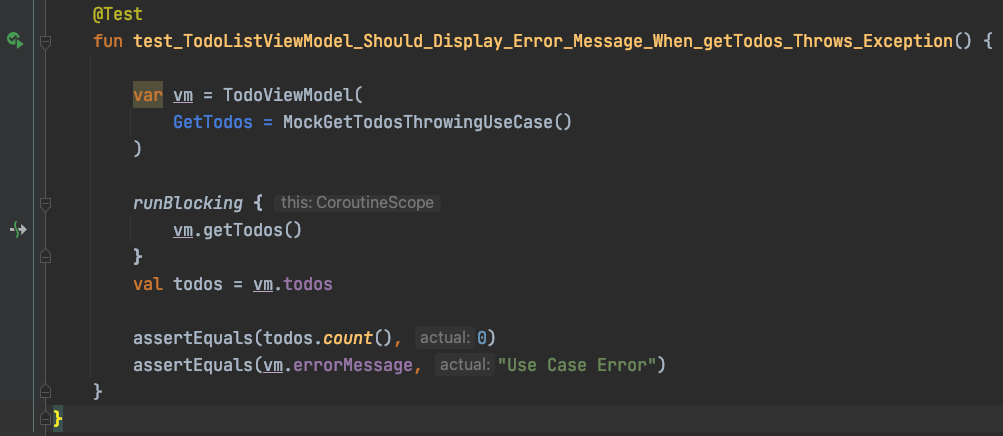
#### test_TodoListViewModel_Should_Display_Error_Message_When_getTodos_Throws_Exception
<div style="border: 2px solid red; text-align: center; margin-bottom:10px">


![Screenshot 2021-10-27 at 11.22.30.png](https://cdn.hashnode.com/res/hashnode/image/upload/v1635326624595/zGz1sIBY9.png)


</div>


```kt
class MockGetTodosThrowingUseCase : GetTodos {

    override suspend operator fun invoke(): List<Todo> {
        throw Exception("Use Case Error")
    }
}
```

```kt

class TodoViewModel constructor(private val GetTodos: GetTodos) : ViewModel() {
    private val _todos = mutableStateListOf<Todo>()
    val todos: List<Todo>
        get() = _todos

    private val _errorMessage = mutableStateOf("")
    val errorMessage: String
        get() = _errorMessage.value

    suspend fun getTodos() {
        try {
            _todos.clear()
            val result = GetTodos()
            _todos.addAll(result)
        } catch (err: Exception) {
            _errorMessage.value = err.message.toString()
        }
    }
}
```
<div style="border: 2px solid green; text-align: center; margin-bottom:10px">


![Screenshot 2021-10-27 at 11.23.21.png](https://cdn.hashnode.com/res/hashnode/image/upload/v1635326615634/3hweEVRj2.png)
</div>

We can now continue down the flow dependency chain, unit testing and mocking until we complete the "get todos" use case.


