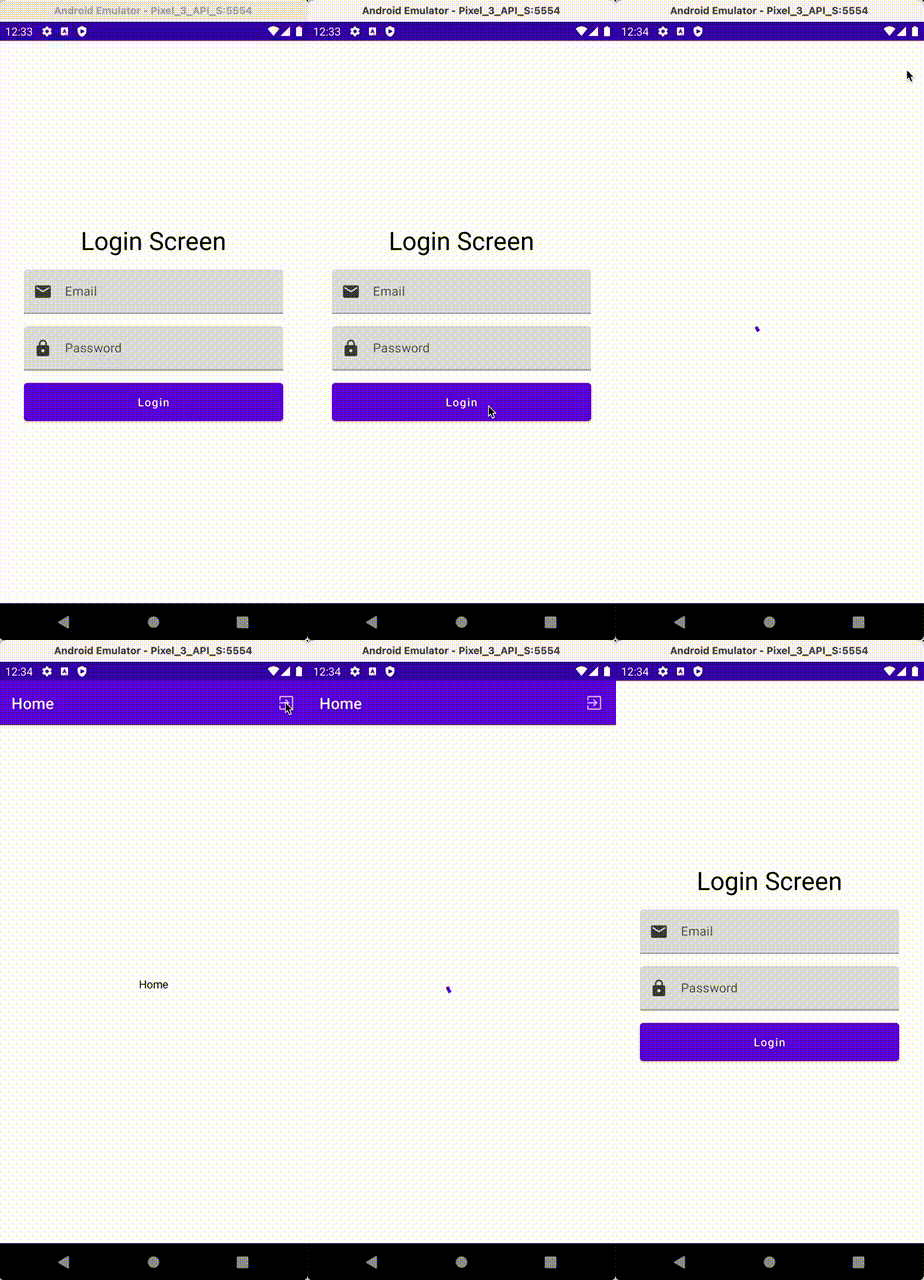
Login / Logout Flow: Android Jetpack Compose and CompositionLocal

CompositionLocal is useful when you want to create a dependency in a higher node of the layout tree and use it on a lower node without having to pass it down the tree through every child Composable.
Here we will use it to direct our application when a user logs in and out.
- When the user is successfully logged in (isLoggedIn = true), they are directed to the rest of the application views.
- When a user is logged out (isLoggedIn = false) at any point within the app, they are directed to the login page.
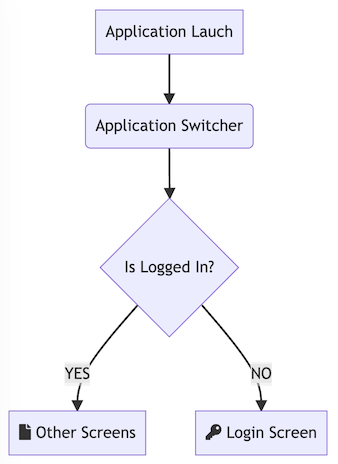
We need the following components:
- User State View Model
- Application Switcher
- Login Screen
- Home Screen
User State View Model
The UserStateViewModel keeps track of and broadcasts our user status. We are going to store this view model to a CompositionLocal.
import androidx.compose.runtime.compositionLocalOf
import androidx.compose.runtime.getValue
import androidx.compose.runtime.mutableStateOf
import androidx.compose.runtime.setValue
import androidx.lifecycle.ViewModel
import kotlinx.coroutines.delay


class UserStateViewModel : ViewModel() {
    var isLoggedIn by mutableStateOf(false)
    var isBusy by mutableStateOf(false)

    suspend fun signIn(email: String, password: String) {
        isBusy = true
        delay(2000)
        isLoggedIn = true
        isBusy = false
    }

    suspend fun signOut() {
        isBusy = true
        delay(2000)
        isLoggedIn = false
        isBusy = false
    }
}

val UserState = compositionLocalOf<UserStateViewModel> { error("User State Context Not Found!") }
We make our view model instance available to all child composables, starting from the ApplicationSwitcher composable
class MainActivity : ComponentActivity() {
    private val userState by viewModels<UserStateViewModel>()
    override fun onCreate(savedInstanceState: Bundle?) {
        super.onCreate(savedInstanceState)
        setContent {
            CompositionLocalProvider(UserState provides userState) {
                ApplicationSwitcher()
            }
        }
    }
}
Application Switcher
@Composable
fun ApplicationSwitcher() {
    val vm = UserState.current
    if (vm.isLoggedIn) {
        HomeScreen()
    } else {
        LoginScreen()
    }
}
Login Screen
The Login screen can now use the UserStateViewModel to invoke signIn
@Composable
fun LoginScreen() {
    var email by remember { mutableStateOf("") }
    var password by remember { mutableStateOf("") }
    val coroutineScope = rememberCoroutineScope()
    val vm = UserState.current
    Column(
        Modifier
            .fillMaxSize()
            .padding(32.dp),
        verticalArrangement = Arrangement.Center,
        horizontalAlignment = Alignment.CenterHorizontally
    ) {
        if (vm.isBusy) {
            CircularProgressIndicator()
        } else {
            Text("Login Screen", fontSize = 32.sp)
            Spacer(modifier = Modifier.height(16.dp))
            Email(email, onChange = {
                email = it
            })
            Spacer(modifier = Modifier.height(16.dp))
            Password(password, onChange = {
                password = it
            })
            Spacer(modifier = Modifier.height(16.dp))
            LoginButton(onClick = {
                coroutineScope.launch {
                    vm.signIn(email, password)
                }
            })
        }


    }
}
Home Screen with Logout Button
The Home screen also uses the UserStateViewModel to invoke the signOut
@Composable
fun HomeScreen(navController: NavHostController) {
    val vm = UserState.current
    val coroutineScope = rememberCoroutineScope()
    Scaffold(
        topBar = {
            TopAppBar(
                title = { Text("Home") },
                actions = {
                    IconButton(onClick = {
                        coroutineScope.launch {
                            vm.signOut()
                        }
                    }) {
                        Icon(Icons.Filled.ExitToApp, null)
                    }
                }
            )
        },
        ) {
        Column(
            Modifier
                .fillMaxSize()
                .padding(16.dp),
            verticalArrangement = Arrangement.Center,
            horizontalAlignment = Alignment.CenterHorizontally
        ) {
            if (vm.isBusy) {
                CircularProgressIndicator()
            } else {
                Text("Home")
            }
        }
    }
}
At all times the Application Switcher is monitoring the isLoggedIn status: