SwiftUI 5.5 Flat and Hierarchical Navigation

Navigation in your app has to be appropriate: Don’t use non-logical navigation.
Navigation must always be intuitive: Users don’t have time to look for the right section in your app
Don’t steal time from your users: They will delete the app
Navigation must be clear: Users have to always know which screen they are on now
When building a business application the 2 main navigation structures are Hierarchical and Flat.
Hierarchical
Users navigate by making only one choice per screen until they reach their destination. To get to another destination, users must either retrace, or start from the beginning and make other choices.
We use NavigationView to implement hierarchical navigation
import SwiftUI


struct ChildView: View {
    var body: some View {
        Text("This is the Child of Screen 1")
    }
}

struct ContentView: View {
    var body: some View {
        NavigationView {
            NavigationLink(destination: ChildView()) {
                Text("Go To Child of Screen 1")
            }.navigationTitle("Screen 1")
        }.navigationViewStyle(StackNavigationViewStyle())
    }
}
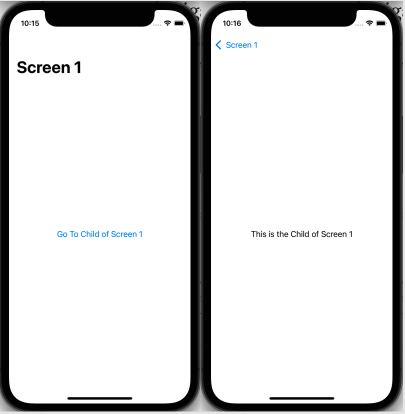
Clicking on the Navigation Link will push the child screen onto Screen 1
Flat
All the primary screens can be navigated from the main screen.
We use TabViews to implement flat navigation.
import SwiftUI


struct ChildView: View {
    var body: some View {
        Text("This is the Child of Screen 1")
    }
}

struct Screen1View: View {
    var body: some View {
        NavigationView {
            NavigationLink(destination: ChildView()) {
                Text("Go To Child of Screen 1")

            }.navigationTitle("Screen 1")
        }.navigationViewStyle(StackNavigationViewStyle())
    }
}

struct Screen2View: View {
    var body: some View {
        NavigationView {
            Text("Screen 2").navigationTitle("Screen 2")
        }.navigationViewStyle(StackNavigationViewStyle())
    }
}

struct ContentView: View {
    var body: some View {
        TabView{
            Screen1View()
                .tabItem({
                    Label("One", systemImage: "1.circle")
                })
            Screen2View()
                .tabItem({
                    Label("Two", systemImage: "2.circle")
                })
        }
    }
}
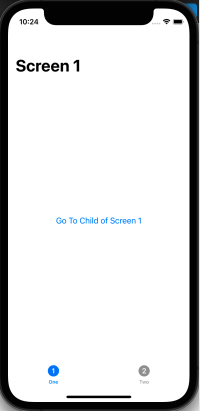
We’ve now incorporated hierarchical nav inside of flat nav with a TabView and given the tabs labels and icons


