Core Data and Swift

Continuing with our clean architecture, let’s write a simple Todo CoreData Datasource in swift. Our applications repository method would use the DataSource, in this case, the TodoCoreDataSource. Here is the proposed files and their locations:
├─Core
└─Data
    ├─DataSource
    │   ├── TodoDataSource.swift
    │   └─CoreData
    │       ├── Main.xcdatamodeld
    │       └── TodoCoreDataSourceImpl.swift
    └─Repository
        └── TodoRepositoryImpl.swift

├─Presentation
└─Domain
    ├─Model
    │ └── Todo.swift
    ├─Error
    │ └── TodoError.swift
    └─Repository
      └── TodoRepository.swift
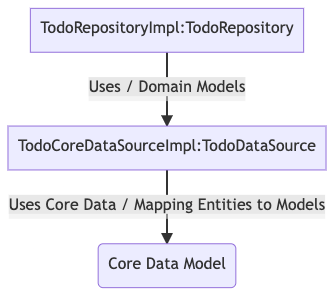
Let’s first specify our Domain Model and Repository. We need a domain model because we can’t always control what our data source model looks and operates like.
struct Todo: Identifiable{
    let id: UUID
    let title: String
    let isCompleted: Bool
}
Mapping between these two models would need to take place in our data source.
protocol TodoDataSource{
 func getAll() async throws -> [Todo]
 func getById(_ id: UUID) async throws -> Todo?
 func delete(_ id: UUID) async throws -> ()
 func create(todo: Todo) async throws -> ()
 func update(id: UUID, todo: Todo) async throws -> ()
}
This time around we need a persistence framework for our data source. Here we’re going to use Core Data to save your application’s permanent data for offline use.
Create a CoreData Model by adding a new file and choosing Core Data -> Data Model and creating at TodoCoreDataEntity:
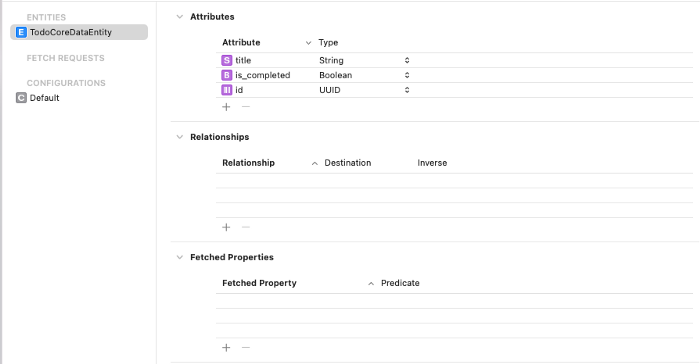
To use the CoreData Main Model we can create a data source that conforms to the TodoDataSource and uses the NSPersitanceContainer.
import Foundation
import CoreData

struct TodoCoreDataSourceImpl: TodoDataSource {

    let container: NSPersistentContainer

    init(){
        container = NSPersistentContainer(name: "Main")
        container.loadPersistentStores { description, error in
            if error != nil {
                fatalError("Cannot Load Core Data Model")
            }
        }
    }

    func getAll() throws -> [Todo]{
        let request = TodoCoreDataEntity.fetchRequest()
        return try container.viewContext.fetch(request).map({ todoCoreDataEntity in
            Todo(
                id: todoCoreDataEntity.id!,
                 title: todoCoreDataEntity.title!,
                isCompleted: todoCoreDataEntity.is_completed
            )
        })

    }

    func getById(_ id: UUID)  throws  -> Todo?{
        let todoCoreDataEntity = try getEntityById(id)!
        return Todo(
            id: todoCoreDataEntity.id!,
            title: todoCoreDataEntity.title!,
            isCompleted: todoCoreDataEntity.is_completed
        )

    }

    func delete(_ id: UUID) throws -> (){
        let todoCoreDataEntity = try getEntityById(id)!
        let context = container.viewContext;
        context.delete(todoCoreDataEntity)
        do{
            try context.save()
        }catch{
            context.rollback()
            fatalError("Error: \(error.localizedDescription)")
        }

    }

    func update(id: UUID, todo: Todo) throws -> (){
        let todoCoreDataEntity = try getEntityById(id)!
        todoCoreDataEntity.is_completed = todo.isCompleted
        todoCoreDataEntity.title = todo.title
        saveContext()
    }

    func create(todo: Todo) throws -> (){
        let todoCoreDataEntity = TodoCoreDataEntity(context: container.viewContext)
        todoCoreDataEntity.is_completed = todo.isCompleted
        todoCoreDataEntity.title = todo.title
        todoCoreDataEntity.id = todo.id
        saveContext()
    }


    private func getEntityById(_ id: UUID)  throws  -> TodoCoreDataEntity?{
        let request = TodoCoreDataEntity.fetchRequest()
        request.fetchLimit = 1
        request.predicate = NSPredicate(
            format: "id = %@", id.uuidString)
        let context =  container.viewContext
        let todoCoreDataEntity = try context.fetch(request)[0]
        return todoCoreDataEntity

    }

    private func saveContext(){
        let context = container.viewContext
        if context.hasChanges {
            do{
                try context.save()
            }catch{
                fatalError("Error: \(error.localizedDescription)")
            }
        }
    }

}
and then lastly, our TodoRepositoryImpl would implement our TodoRepository and call our Datasource:
protocol TodoRepository {
 func getTodos() async -> Result<[Todo], TodoError>
 func getTodo(id: UUID) async -> Result<Todo? , TodoError>
 func deleteTodo(_ id: UUID) async -> Result<Bool, TodoError>
 func createTodo(_ todo: Todo) async -> Result<Bool, TodoError>
 func updateTodo(_ todo: Todo) async -> Result<Bool, TodoError>
}
enum TodoError: Error{
 case DataSourceError, CreateError, DeleteError, UpdateError, FetchError
}
import Foundation

struct TodoRepositoryImpl: TodoRepository{

    var dataSource: TodoDataSource

    func getTodo(id: UUID) async  -> Result<Todo?, TodoError> {
        do{
            let _todo =  try await dataSource.getById(id)
            return .success(_todo)
        }catch{
            return .failure(.FetchError)
        }

    }

    func deleteTodo(_ id: UUID) async ->  Result<Bool, TodoError>  {
        do{
            try await dataSource.delete(id)
            return .success(true)
        }catch{
            return .failure(.DeleteError)
        }

    }

    func createTodo(_ todo: Todo) async ->  Result<Bool, TodoError>   {
        do{
            try await dataSource.create(todo: todo)
            return .success(true)
        }catch{
            return .failure(.CreateError)
        }

    }

    func updateTodo(_ todo: Todo) async ->  Result<Bool, TodoError>   {
        do{
            try await dataSource.update(id: todo.id, todo:todo)
            return .success(true)
        }catch{
            return .failure(.UpdateError)
        }

    }

    func getTodos() async -> Result<[Todo], TodoError> {
        do{
            let _todos =  try await dataSource.getAll()
            return .success(_todos)
        }catch{
            return .failure(.FetchError)
        }
    }
}


